Apple cluster control is one computer managing many iPhones. No jailbreak. From EC iOS USB 10.7.0 (2026-09-08), USB HID can run without installing an app on the phone, with no Bluetooth or OTG board. The phone has to be iOS 17 or later, and it is mutually exclusive with “start automation.” From 10.6.0 (2026-09-02), the AI agent is iEasyRun, at https://ieasyrun.com .
Changing a batch of settings, publishing one piece of content, exporting data once, running one verification: if this kind of thing will not be done again in the next month, writing a script means splitting the actions first, trial-running, and then following UI changes afterwards. When it runs only once, all of those steps land on that single time. You can describe the task in iEasyRun chat and let the workstation execute it.
Decide whether it will come back, then pick the right devices
Look at whether it will be done again in the next month. If it will not, treat it as a one-off. If the actions are the same every time, write the steps clearly in chat. If each time needs a judgement on the spot, use AI refine mode and talk the steps out first. Done once, with fixed steps: use chat. Done once, with many steps: use chat, and save it as a workflow after it runs cleanly. Several times in a month: use a workflow or a script.
When you cannot state the steps yourself, use AI refine mode. The screen is on the chat page:
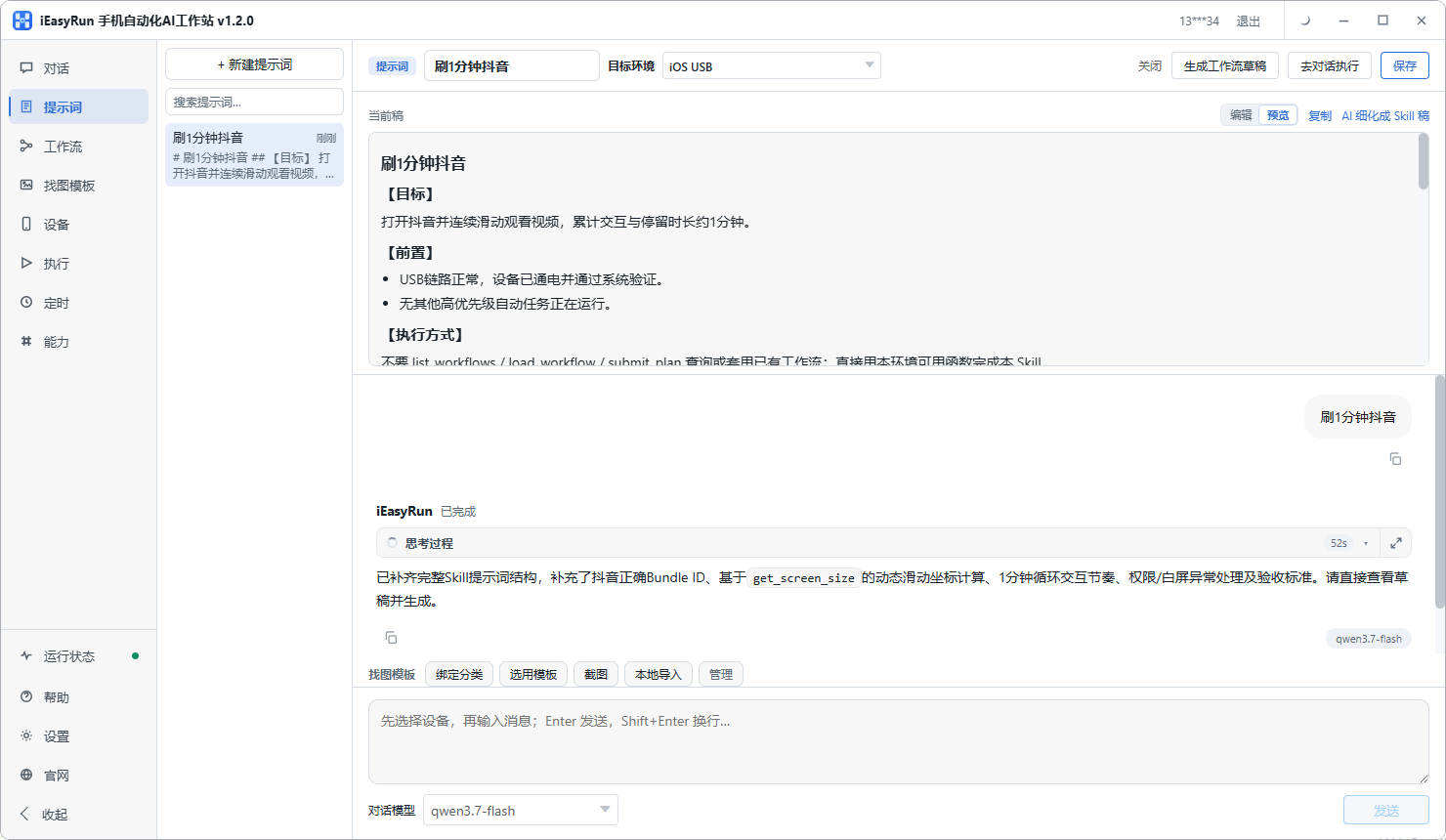
It lives on the chat page, and its job is to talk a fuzzy piece of work into a list of steps that can be executed.
Pick the wrong device and the task runs on another machine. Once the library has many devices, skip picking by index. Go to the Devices page first: scan, add to the library, give an alias, group. Aliases carry the purpose and an index, such as test-01 or shop-03. When a one-off arrives, check by group. After you check them, confirm they are online. An offline device cannot run a task. Even if you want to cover all of them, trial-run two devices first, and roll out after the description is right. If you change the description after the rollout, the devices that did not finish have to be filled in on their own.
Describe the task in five parts
Back on the chat page, check the target devices and write the job down. A five-part template is enough:
On [which devices] → open [which app] → in order [where to tap, what to fill, what to wait for] → [what condition] counts as done → stop on [which page] when finished
Filled in once, that is:
On this group of 3 devices, open Settings, go to “General → Software Update,” return when you see “already the latest version,” and stop on the Home Screen when done.
Skip inventing the part you cannot write. Switch to AI refine mode, say both what you know and what you are unsure about, and let it list the steps. If there is a load between two steps, write “wait until the page has loaded” or “wait until the prompt appears.” Write the device scope as the group name. Skip “the first one, the second one,” because indexes change. Descriptions you use often can be saved as prompts, and next time you change a few words and use them again.
Check the execution log as soon as it finishes
After the run, look at the result and the errors in the execution history. Which devices finished, and which step the others stopped on, stay here. If it looked like it was running and you never open the log, the next day is when you find some devices never finished.
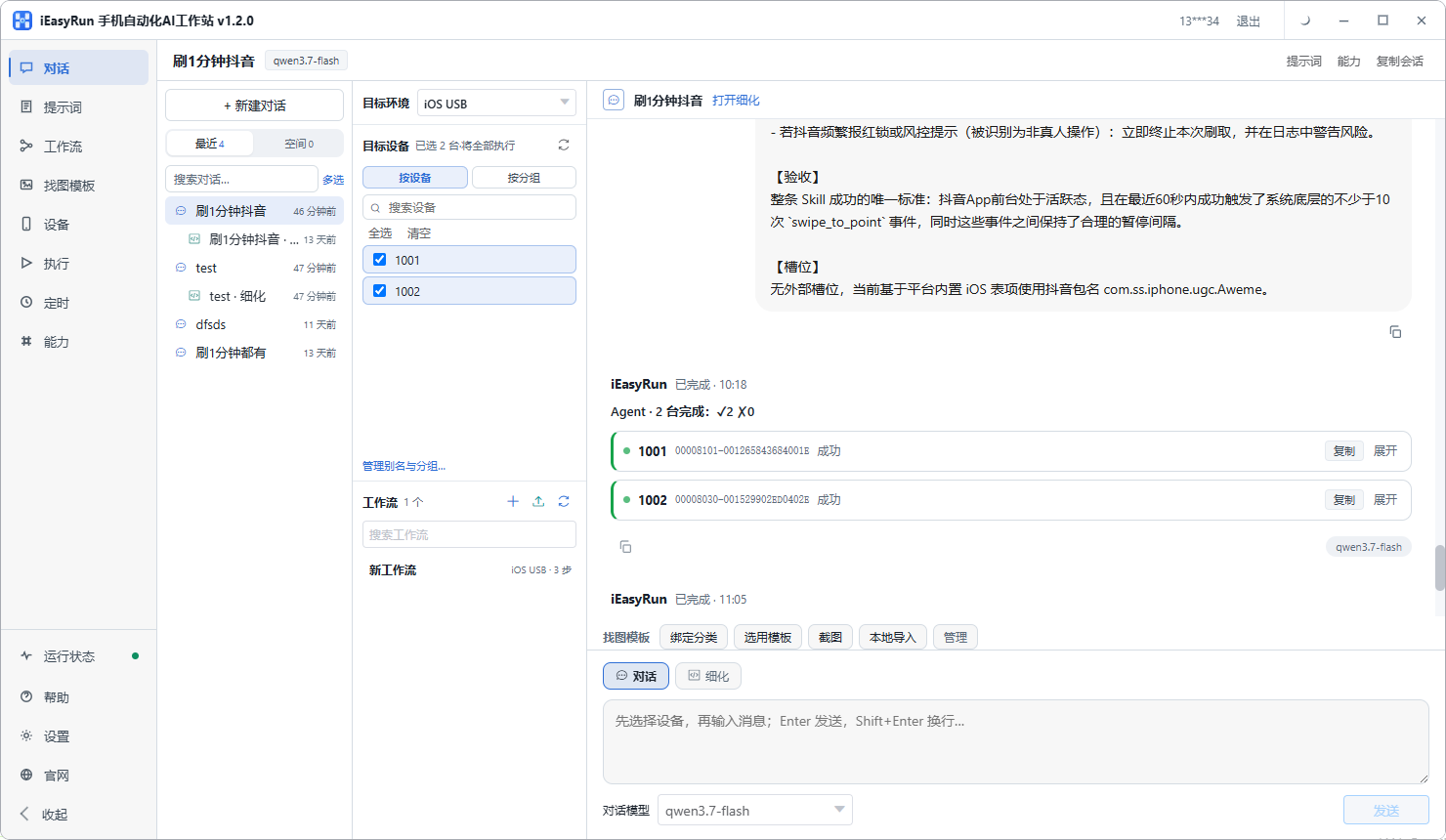
When you see the devices that failed, separate a device problem from a task problem first: a dropped device goes back to the Devices page; a button the UI cannot recognize gets an image-match template; an ambiguous description goes back to the chat page to be edited. For the fill-in run, skip rerunning the whole group. Pick out the devices that failed and run those once. While you are checking, note which steps this run used. The next time a job of the same type comes in, editing from that note is faster than writing it again.
Two or three times in a row, save it as a workflow
If this job comes twice, then three times, it is no longer one-off. Save the steps that ran cleanly this time as a workflow, and next time pick the devices and call it directly. The workflow side can manage flows, arrange steps, and let AI collaborate on a draft you then edit. When you save it, write the name clearly. “Monthly settings check” is more useful than “task 1.” If it has to run at a fixed time, add a workflow schedule. The schedule is local: the computer has to be on and the workstation has to be running. Confirm that before you put it on the calendar.
Flows that need complex branches, have to connect to an outside system, or need fixed timing are still written as scripts. When something moves from once only to every week, move it from chat to a workflow. A workflow you use only once or twice a year does not have to stay on a schedule. The iEasyRun software itself charges nothing, and there is no feature paywall. For an iPhone to run automation, you bind an EasyClick USB device license, bought by device count. The model cost is paid separately to the provider you choose.
After a one-off runs cleanly and you want to extend it, these pieces follow on: what USB HID changed in Apple cluster control covers the change in how devices connect, one central control managing 100 iPhones covers operations after the device count goes up, and how to set scheduled tasks covers a fixed-cadence calendar.
- iEasyRun site and install: https://www.ieasyrun.com/docs/install
- iEasyRun docs: https://www.ieasyrun.com/docs
- Apple cluster control system: https://ieasyclick.com/apple_qunkong/
- EasyClick developer docs: https://ieasyclick.com/docs/
- Further reading: iOS no-jailbreak scripting in practice, a practical comparison of iOS no-jailbreak automation
About EasyClick: A mobile automation script development platform covering three phone ecosystems: Android without root, iOS without jailbreak, and HarmonyOS. It also offers Apple script writing, Apple cluster control, Android cluster control, remote cloud control, and AI phone cluster control. → Explore all products
Ready to build it for real?
Every approach in this article can be built with EasyClick capabilities on iEasyClick — full documentation, developer tools and automation products, free to try.